

Continuity is the product
Missing media never becomes dead air. ModernPlay steps through filler, station slate, then generated black and silence—bounded to the exact gap.
Controlled pilot · commissioned deployment
ModernPlay turns prepared media in your S3 or R2 bucket into a timed, continuously encoded RTMP feed. Schedule it, monitor it, and keep a durable record from one operator console.
01 The platform
ModernPlay is scheduled-VOD playout for broadcast and FAST channels, designed around the three failures that cost operators airtime: continuity, timing, and missing evidence.
Missing media never becomes dead air. ModernPlay steps through filler, station slate, then generated black and silence—bounded to the exact gap.
Schedules resolve to absolute channel-time intervals. Broadcast-day starts, timezones, daylight-saving changes, and hard boundaries stay deterministic.
Transitions, fallbacks, and outages land in a durable as-run record. What aired is queryable evidence, not a reconstruction from encoder logs.
02 Current product UI
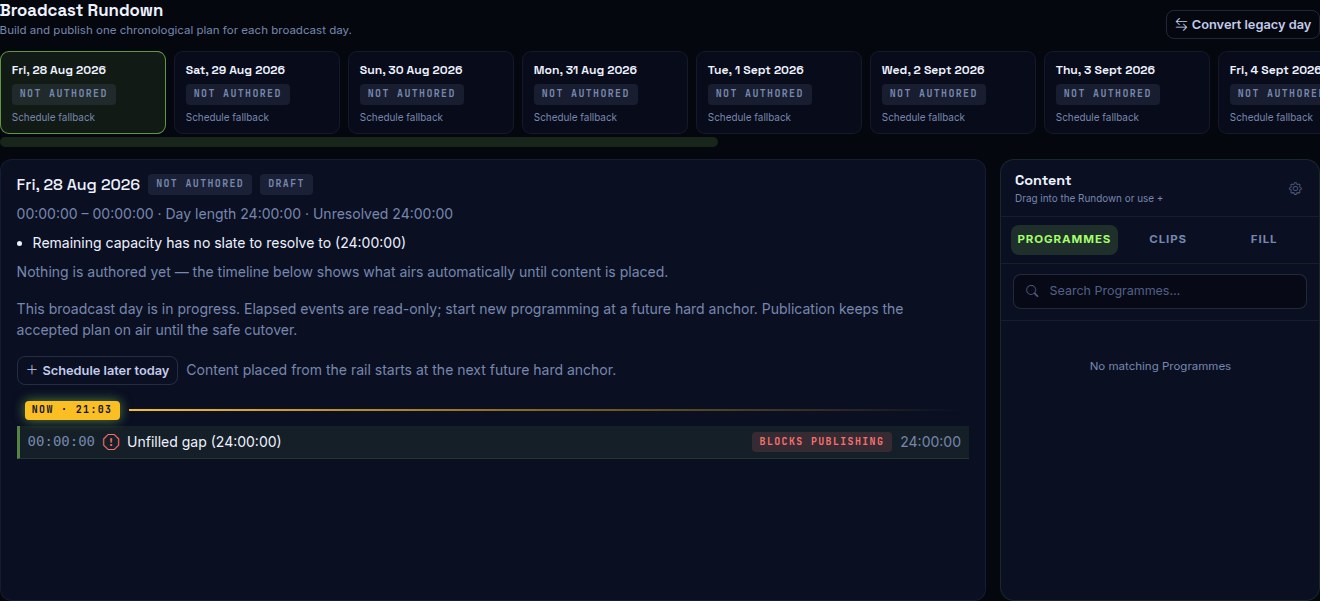
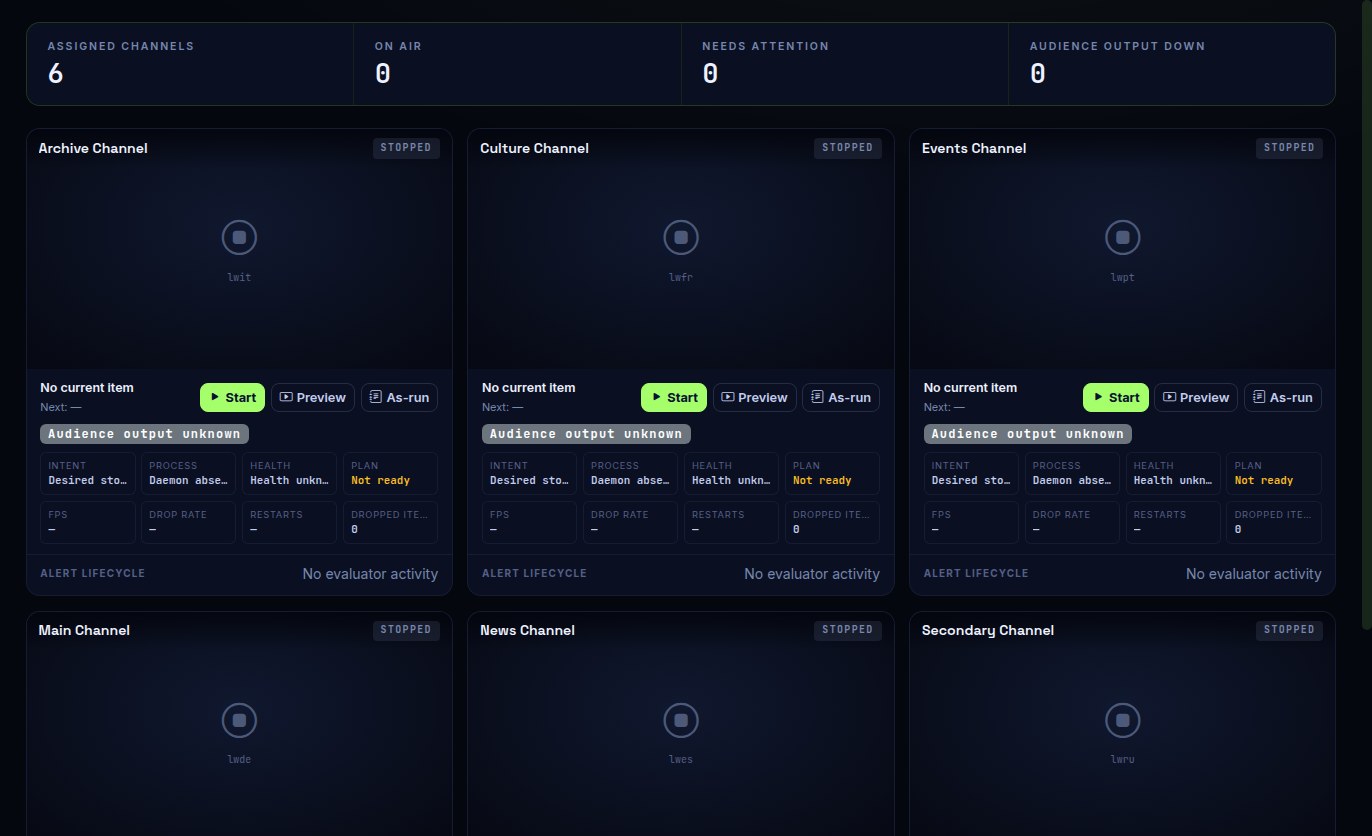
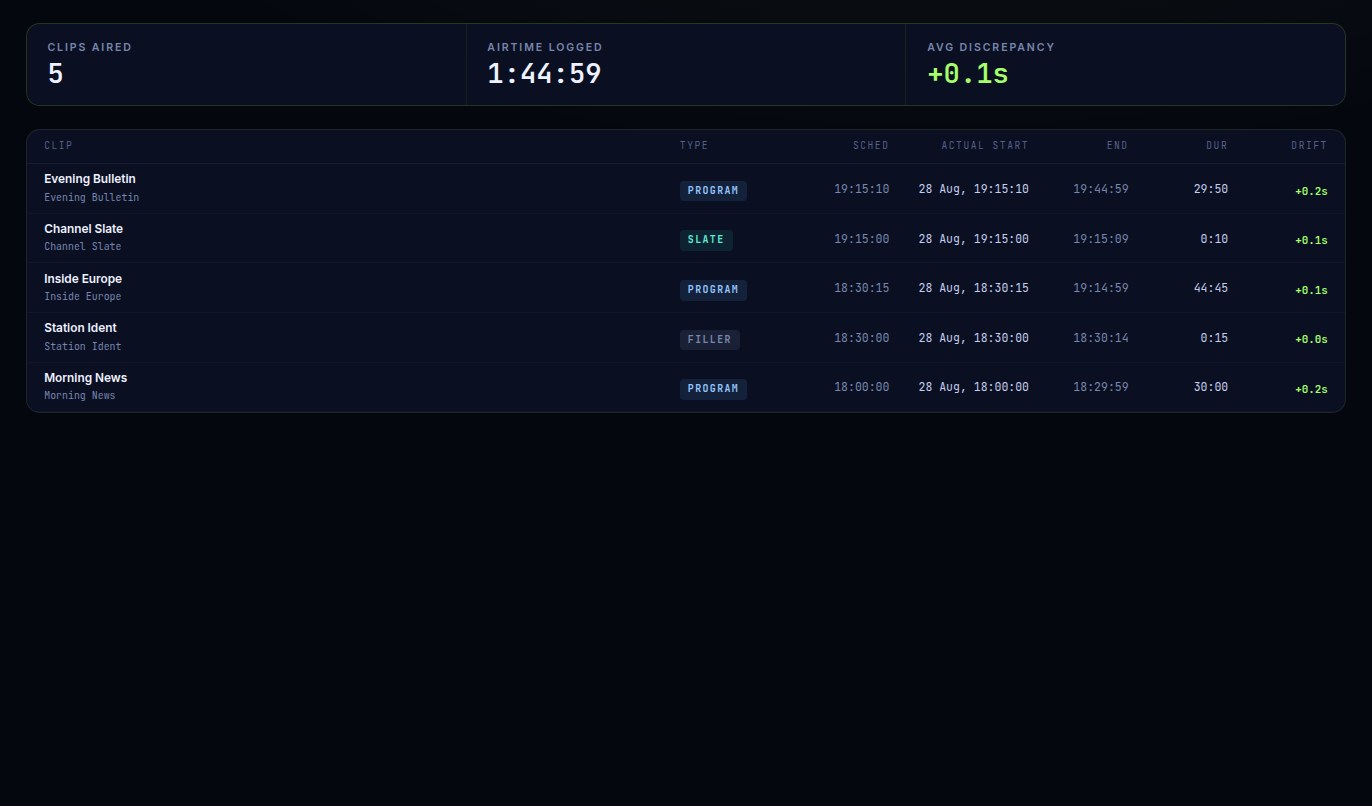
Build the day, hold the channel, keep the evidence. These are current ModernPlay operator surfaces, captured with representative commissioning data.
 Open full interface in a new tab
The Rundown makes authored state, unresolved time, and publish blockers visible before a plan can reach air. Operators work against the channel clock, not a loose playlist.
 Open full interface in a new tab
Master Control shows the exact state of each channel—on air, off, or needing attention—with now/next context, controls, alerts, and a direct path to evidence.
 Open full interface in a new tab
Every transition becomes a channel-timezone record with clip type, scheduled and actual times, duration, and drift—ready to inspect or export without reconstructing encoder logs.
03 The signal path
The operating model is three decisions, not six layers of infrastructure. Technical detail stays available below when your engineering team needs it.
Upload straight to S3 or R2. ModernPlay checks eligibility, keeps the source untouched, and creates one predictable house mezzanine.
Build the broadcast day with reusable programmes and hard anchors. Validation resolves the channel clock before anything can publish.
Prefetch the accepted plan, encode on the GPU, push RTMP or RTMPS, cover failures, alert operators, and record every transition.
04 Technical detail
The operating story stays short. Engineering detail remains here for fit checks, without making every visitor read a twelve-card inventory.
05 Deployment
ModernPlay is commissioned into your infrastructure. Your media, stream keys, database, and network path stay yours; capacity is measured against the channels you intend to run.
A continuous, well-timed feed for a CDN or aggregator.
A VOD library in object storage, without a traditional playout rack.
Multiple channels, one operator surface, and evidence under your control.
06 Scope, stated plainly
Playout is bought on trust. Start with the three shipped outcomes; open the complete boundary when a specific requirement decides whether ModernPlay fits.
Direct object-storage ingest, eligibility, normalisation, and a channel-time Rundown that must validate before publication.
GPU playout, destination preflight, bounded fallback, and durable desired state across process and host restarts.
Master Control, live preview, metrics, alert delivery, audience-side probing, and durable as-run evidence.
07 Questions
No. ModernPlay is installed on a GPU host you own or rent, alongside its database and cache volume. We commission it with you, and you keep control of the media, the keys, and the network path.
There is no price list, because there is no one-size deployment. Scope depends on channel count, host, storage, distribution, and how much of the commissioning and operations you want us to carry. Send an enquiry and we will scope it against your actual channels.
MP4 files up to 5 GB, uploaded straight to your bucket from the browser. Each accepted file is probed and normalised once into a house mezzanine so every clip on air shares one stream layout. Anything that cannot be made to conform is rejected with the reason, before it can reach a schedule.
Wherever takes RTMP or RTMPS: a CDN ingest, a Wowza server, or another packaging layer. ModernPlay produces the continuous encoded feed and probes the resulting HLS to confirm the audience side is actually up. It does not package or serve HLS itself.
That is a GPU, profile, and schedule question, so we measure it rather than guess. Capacity qualification is part of commissioning, and the monitoring that proves it is part of the product.
Missing or invalid media is skipped and covered by filler, slate, or generated black and silence. Encoder crashes, daemon restarts, and host reboots resume at the position the wall clock says should be airing. Alert rules page you by email or webhook, and the as-run log records exactly what the audience got.
Controlled pilot · commissioned with your team
Tell us where the media lives, where the feed must land, and what failure coverage matters. We will confirm fit, qualification needs, and what commissioning would involve.